Check your MEPCO Bill in seconds using your 14-digit reference number or 10-digit customer ID. View, download, or print your duplicate bill anytime with this free and easy-to-use tool.
Check MEPCO Bill Online
How to Check Your MEPCO Bill Online
Online bill check is quick, secure, and completely free. You can access your electricity bill online anytime without visiting a customer service center. Checking your bill online takes only a few seconds. Follow these simple steps:
- Enter your 14-digit Reference Number or 10-digit Customer ID
- Click the “Check Bill” button
- View your latest MEPCO bill instantly
- Download the PDF or print a duplicate copy
The online bill-checking service is available 24/7, allowing you to access your bill from home, at the office, or on your mobile device whenever you need it. There’s no need to stand in long queues or visit a MEPCO office. Enter your bill information to view, download, or print your duplicate bill online. Your 14-digit Reference Number is printed on every electricity bill and is used to retrieve your billing record. You can also use your 10-digit Customer ID for quick access. Along with viewing your duplicate bill, you can verify your billing details, payment status, due date, and electricity consumption in just a few clicks. The online bill service is designed to save time, reduce paperwork, and provide fast access to your latest electricity bill whenever required.
What is a Reference Number and How to Find it?
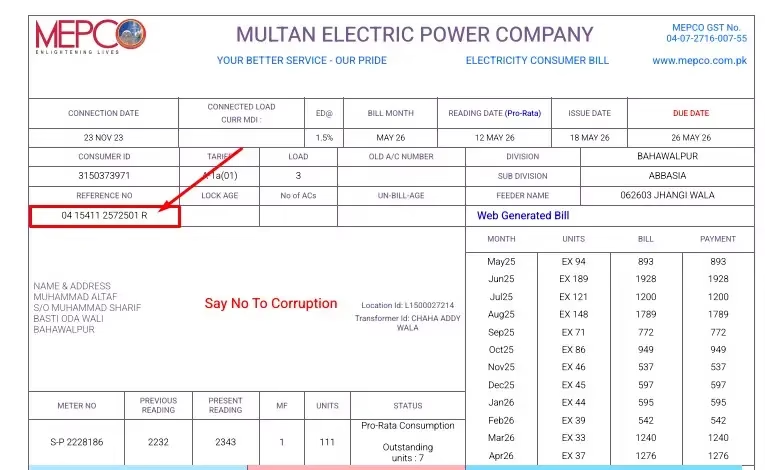
Your 14-digit MEPCO reference number is available on every electricity ebill. It is usually located at the top of the bill and is required to check your bill online. In the sample image below, the reference number is marked with a red box.
No Old MEPCO Bill? Here’s How to Find Your Reference Number
If you’ve misplaced your previous MEPCO bill, there’s no need to worry. You can retrieve your 14-digit reference number using your 13-digit CNIC through MEPCO’s official consumer portal. Once you have the reference number, you can easily check, download, or print your duplicate bill online.
Follow These Steps
- Open the official MEPCO consumer portal.
- Choose the Search by CNIC option.
- Enter your 13-digit CNIC number without spaces or dashes.
- Click the Search or Submit button.
- Your registered electricity connection details, including the 14-digit reference number, will be displayed.
- Copy the reference number and use it to check your latest MEPCO bill online.
Keep Your Information Secure
Your CNIC is sensitive personal information. Always use the official MEPCO website when searching for your reference number. Avoid entering your CNIC on unofficial websites or apps that are not affiliated with MEPCO.
Who Can Use This Method?
This option is especially useful if:
- You have lost your previous electricity bill.
- You don’t remember your 14-digit reference number.
- Your electricity connection is newly installed.
- You want to check your MEPCO bill but only have your CNIC available.
Using your CNIC is one of the quickest ways to recover your reference number and access your duplicate bill without needing an old bill.
MEPCO Bill Check Using Customer ID
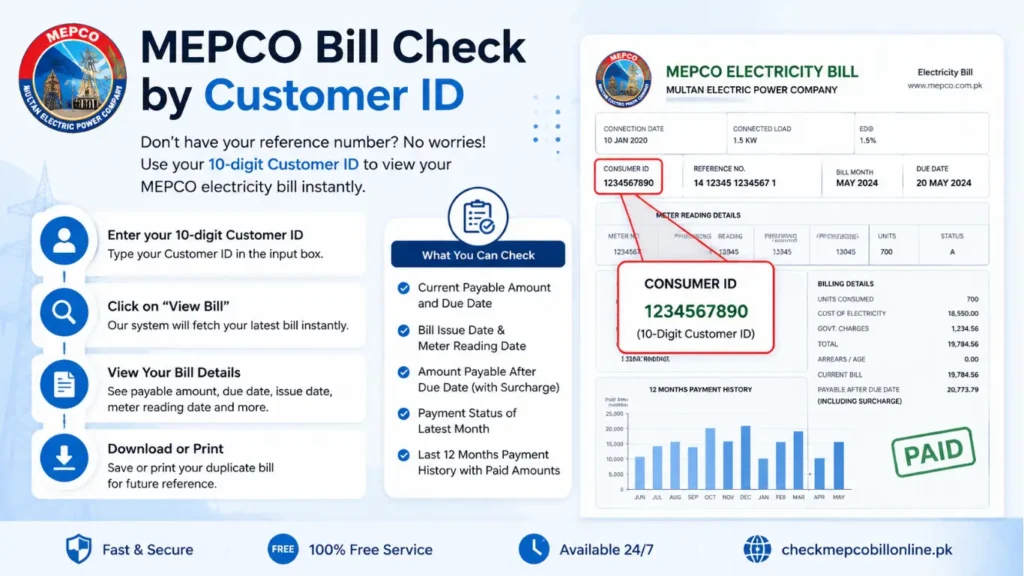
If you do not have your 14-digit Reference Number, you can still access your bill by using your 10-digit Customer ID. Simply enter the Customer ID in the search box, click “View Bill”, and your latest electricity bill will appear within seconds.
What you can do with your Customer ID:
- Enter your 10-digit Customer ID to retrieve your latest MEPCO bill.
- Instantly view the current payable amount and bill due date.
- Download or print a duplicate copy whenever required.
- Check the bill issue date and meter reading date.
- See the amount payable after the due date, including any applicable late payment surcharge.
- Verify whether the latest bill has already been paid or is still outstanding.
- Review your last 12 months’ billing and payment history to keep track of your electricity expenses.
Where Can You Find the Customer ID?
Your Customer ID is a unique 10-digit number printed on every MEPCO electricity bill. It is usually displayed just below or near the Reference Number, making it easy to locate whenever you need to check your bill online.
This method is especially useful if your Reference Number is unavailable, but you still need quick access to your latest MEPCO bill.
| Check MEPCO Bill Calculatore |
MEPCO Service Areas
| MEPCO Division | Cities & Tehsils Covered |
|---|---|
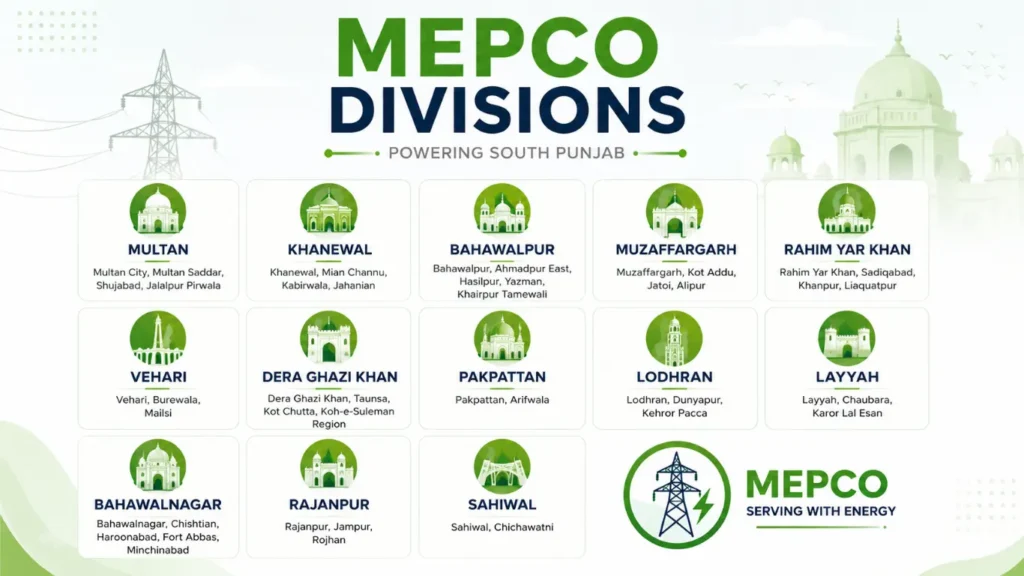
| Multan | Multan City, Multan Saddar, Shujabad, Jalalpur Pirwala |
| Khanewal | Khanewal, Mian Channu, Kabirwala, Jahanian |
| Bahawalpur | Bahawalpur, Ahmadpur East, Hasilpur, Yazman, Khairpur Tamewali |
| Muzaffargarh | Muzaffargarh, Kot Addu, Jatoi, Alipur |
| Rahim Yar Khan | Rahim Yar Khan, Sadiqabad, Khanpur, Liaquatpur |
| Vehari | Vehari, Burewala, Mailsi |
| Dera Ghazi Khan | Dera Ghazi Khan, Taunsa, Kot Chutta, Koh-e-Suleman Region |
| Pakpattan | Pakpattan, Arifwala |
| Lodhran | Lodhran, Dunyapur, Kehror Pacca |
| Layyah | Layyah, Chaubara, Karor Lal Esan |
| Bahawalnagar | Bahawalnagar, Chishtian, Haroonabad, Fort Abbas, Minchinabad |
| Rajanpur | Rajanpur, Jampur, Rojhan |
| Sahiwal | Sahiwal, Chichawatni |
How to Check MEPCO Meter Reading
Your monthly MEPCO electricity bill is prepared according to the number of units recorded on your electricity meter. Each billing cycle, MEPCO collects the latest meter reading and uses it to calculate your electricity consumption. Keeping an eye on your meter yourself is a simple way to verify your usage and identify any unusual increase in units before your next bill arrives.
Why Should You Check Your MEPCO Meter Reading?
- Monitor your monthly electricity consumption.
- Compare the meter reading with the units shown on your bill.
- Detect unexpected increases in electricity usage.
- Keep a photo record of the meter for future reference.
- Reduce the chances of billing disputes.
- Plan your electricity usage to manage monthly expenses more effectively.
Frequently Asked Questions (FAQs)
1. How can I check my MEPCO bill online?
Enter your 14-digit Reference Number or 10-digit Customer ID to instantly view your latest MEPCO electricity bill online.
2. Can I check my MEPCO bill without a Reference Number?
Yes, you can use your 10-digit Customer ID to access your latest bill.
3. Where can I find my MEPCO Reference Number?
The 14-digit Reference Number is printed on the top portion of your previous electricity bill.
4. Where is the Customer ID on a bill?
The 10-digit Customer ID is printed near the Reference Number on your electricity bill.
5. Can I download a duplicate MEPCO bill?
Yes, you can download or print a duplicate copy of your latest MEPCO bill anytime.
6. Is MEPCO bill checking free?
Yes, online bill checking is completely free and available 24/7.
7. Can I check if my MEPCO bill has been paid?
Yes, you can view the payment status of your latest bill online.
8. What details are shown on a MEPCO bill?
Your bill displays the payable amount, due date, meter reading, bill issue date, and other billing details.
9. Can I print my MEPCO bill online?
Yes, after viewing your bill, you can print it directly from your browser.
10. What happens if I pay my MEPCO bill after the due date?
A late payment surcharge may be added to your bill after the due date.
11. Can I view my previous MEPCO bills?
Yes, you can check the payment history and previous billing records if they are available.
12. Is a duplicate MEPCO bill valid for payment?
Yes, a duplicate bill is valid and can be used to pay your electricity bill at authorized payment channels.
13. Why is my MEPCO bill not showing online?
This may happen due to an incorrect Reference Number, Customer ID, or temporary server maintenance.
14. Can I pay my MEPCO bill online?
Yes, you can pay your MEPCO bill through banking apps, mobile wallets, and other supported digital payment services.
15. Which areas are served by MEPCO?
MEPCO supplies electricity to Multan, Bahawalpur, Rahim Yar Khan, Dera Ghazi Khan, Muzaffargarh, Vehari, Khanewal, Lodhran, Layyah, Rajanpur, Bahawalnagar, Pakpattan, and Sahiwal.